
Step 1: Visit the IFS Institute℠ Website
Go to the IFS Institute website: https://ifs-institute.com/
Step 2: Log In to the Customer Portal
In the top-right corner of the website, select Log in, then choose Customer Portal.
Enter the same login credentials you used when you originally registered for your training.
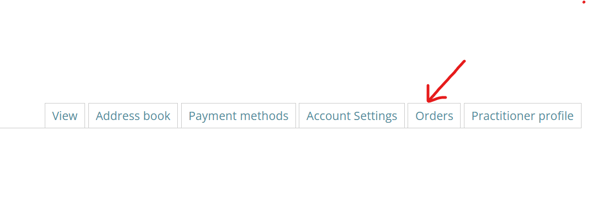
Step 3: Open the Orders Tab
Once you are logged in, you will see several account options. Select the Orders tab to view your order history.
Step 4: Find Your Training Registration Order
On the Orders page, locate the order connected to your training registration.
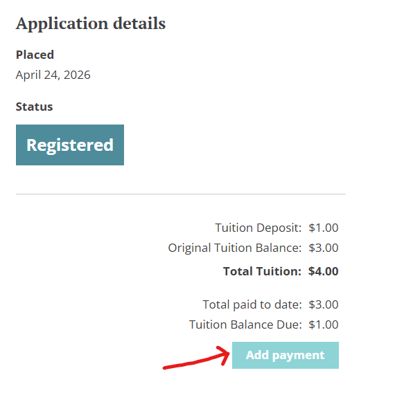
You will see your current balance due for that order. To begin making a payment, select Add Payment below the balance information.

Optional: View Your Order Details First
You can also select View to open the full details of your training registration order.
On the order details page, you will see a detailed breakdown of your tuition, payments, and remaining balance. To make a payment from this page, select Add Payment below the breakdown on the right side.
Step 5: Choose Your Payment Amount and Method
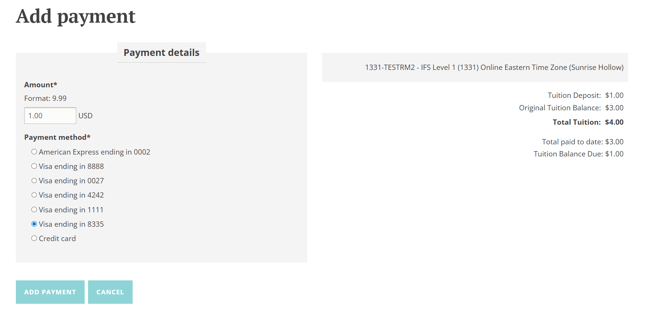
On the payment page, enter the amount you would like to pay and choose your preferred payment method.
When you are ready, select Add Payment. A confirmation popup will appear so you can review and confirm your payment before it is submitted.
Step 6: Confirm Your Updated Balance
Once your payment is processed, your order balance will update to reflect the new amount due.