
Renewing Your Annual Membership Subscription
If you are enrolled in automatic renewal, no action is required. Your membership will renew automatically to ensure uninterrupted access.
If your subscription has lapsed and you are not enrolled in automatic renewal, please contact us for assistance with renewing.
Update Your Payment Method or Cancel Your Membership
To manage your subscription:
Log in to the Learning Hub.
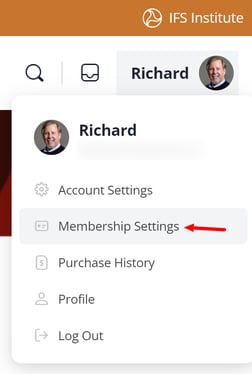
Click your profile icon in the upper right corner.
Select Membership Settings.
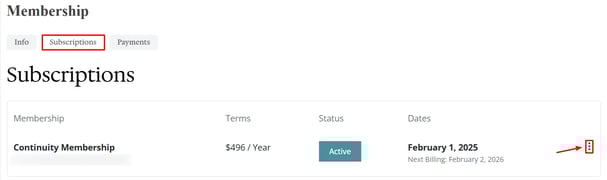
Open the Subscriptions tab.
Click the three vertical dots next to your membership.
From there, you may:
-
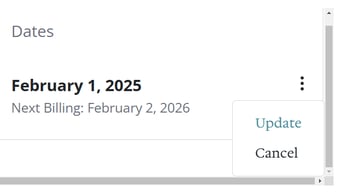
Select Update to manage your payment method for automatic renewal.
-
Select Cancel to stop future renewals.
❗Don't see the Cancel option? In some browsers, you may have to scroll down to see the cancel option.
Selecting Update will take you to a page where you can manage your payment method for automatic renewals.
Selecting Cancel will end your membership subscription the day before the next billing cycle; however, it will not trigger a refund or end your subscription early.
Refund Requests
To submit your refund request:
1. Use our Contact Us form.
2. Select Learning Hub Programs as your issue type
3. Include the program name and date of purchase in your message details
4. Click Send Message.
The continuity membership offers a full refund within 30 days of your purchase, please review our refund policies.